
Blog
Free Trading Journal: The Complete Guide for 2026
Learn what to look for in a free trading journal, how to start in 10 minutes, and when a dedicated app beats spreadsheets — no credit card required.
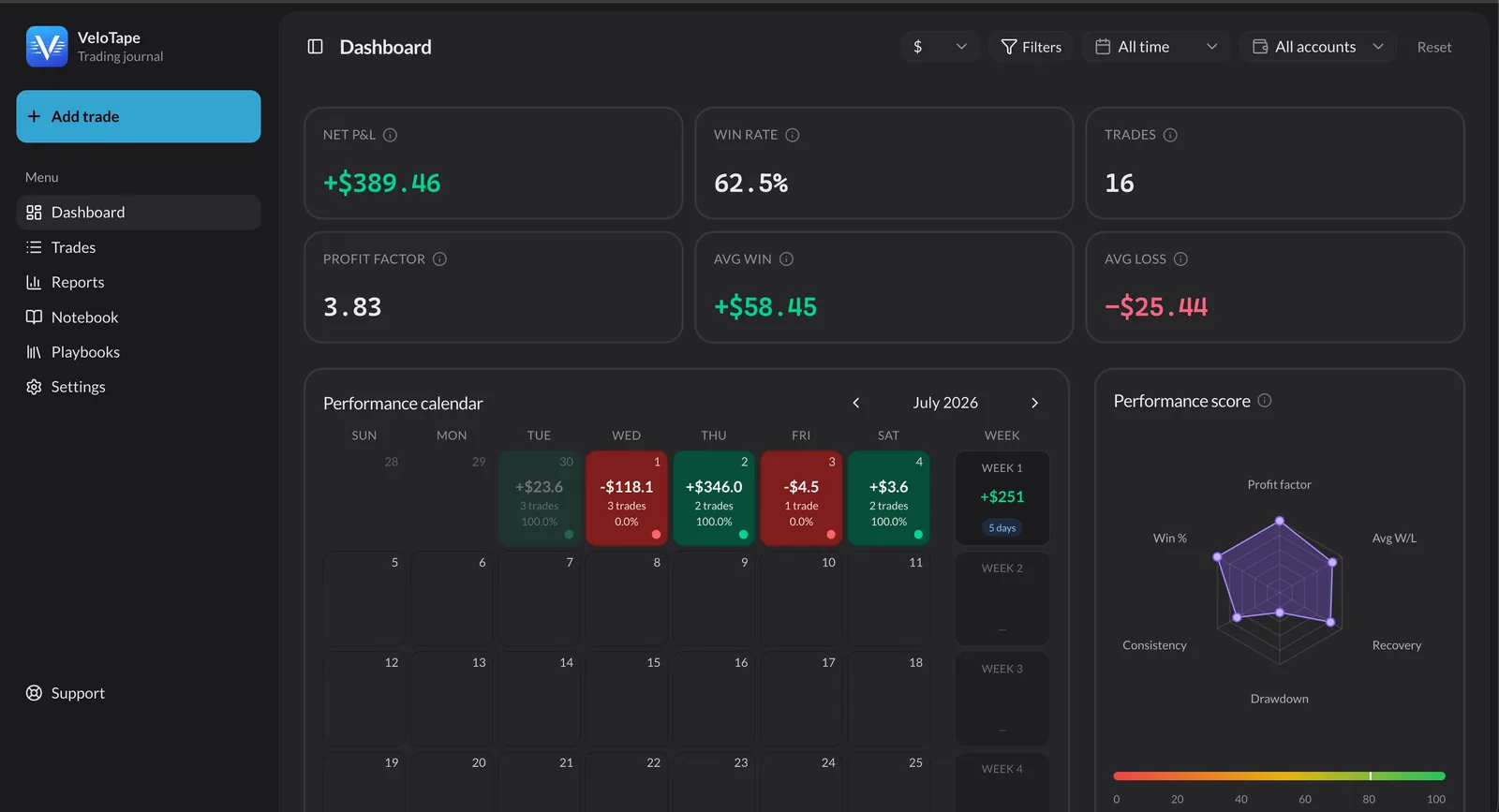
Screenshots show the VeloTape product interface (sample data for illustration).
If you search for a free trading journal, you will find spreadsheets, mobile notes apps, and a dozen SaaS tools claiming to be "free forever." Most traders quit within three weeks — not because journaling fails, but because the tool creates too much friction.
This guide explains what a free online trading journal should actually include, when spreadsheets stop scaling, and how to start in about ten minutes without a credit card.
What is a trading journal (and why traders use one)
A trading journal is a structured record of every trade you take — plus the context around it. The execution layer captures entries, exits, size, and P&L. The review layer captures your setup, rules, emotions, and what you learned.
Professional traders journal for one reason: your memory lies. After a green day you feel invincible. After a red day you rewrite history. A journal keeps an honest scoreboard.
Research on trader performance consistently points to the same pattern — traders who review sessions systematically improve faster than those who rely on gut feel alone. You do not need a expensive platform to start. You need a system you will open tomorrow.
What a free trading journal should include
Not every trading journal free tier is equal. Before you sign up anywhere, check for these six capabilities:
- Trade log — searchable history with entry, exit, side, size, and net P&L.
- Core metrics — win rate, profit factor, average win/loss, and expectancy calculated automatically.
- Performance calendar — daily P&L heatmap so you see streaks and bad weeks instantly.
- Import path — CSV upload or broker sync so you are not typing fills by hand.
- Tags and notes — setup labels (breakout, reversal, news) and session context.
- Room to grow — multiple accounts and exports without hitting a paywall on day three.
If a "free" tool hides the calendar behind a upgrade screen or caps you at ten trades forever, treat it as a trial — not a journal.
Spreadsheet vs dedicated app: an honest comparison
Google Sheets is the most popular free trading journal on earth. It is flexible, private, and costs nothing.
Cost
- Spreadsheet
- Free
- Dedicated journal appRecommended
- Free tier + optional paid
Setup time
- Spreadsheet
- 1–4 hours
- Dedicated journal appRecommended
- 5–15 minutes
Manual entry
- Spreadsheet
- Every field, every trade
- Dedicated journal appRecommended
- CSV or broker sync
Win rate / profit factor
- Spreadsheet
- Build formulas yourself
- Dedicated journal appRecommended
- Calculated automatically
P&L calendar
- Spreadsheet
- Manual or absent
- Dedicated journal appRecommended
- Built-in heatmap
Screenshots
- Spreadsheet
- Awkward file folders
- Dedicated journal appRecommended
- Attached per trade
Scales past ~50 trades/month
- Spreadsheet
- Painful
- Dedicated journal appRecommended
- Designed for volume
| Factor | Spreadsheet | Dedicated journal appRecommended |
|---|---|---|
| Cost | Free | Free tier + optional paid |
| Setup time | 1–4 hours | 5–15 minutes |
| Manual entry | Every field, every trade | CSV or broker sync |
| Win rate / profit factor | Build formulas yourself | Calculated automatically |
| P&L calendar | Manual or absent | Built-in heatmap |
| Screenshots | Awkward file folders | Attached per trade |
| Scales past ~50 trades/month | Painful | Designed for volume |
Rule of thumb: if you trade fewer than a few times per week and enjoy building systems, a spreadsheet is fine. If you trade daily, run prop firm challenges, or skip logging on losing days, move to an app.
VeloTape sits in the app column — with a free plan, no credit card required, CSV import and Prop Desk (prop-firm compliance) on Free, and broker auto-sync on Essential.
How to start a free trading journal in 10 minutes
You do not need perfect notes on day one. You need trades inside a system.
Step 1 — Gather your last 30 days of trades
Export a CSV from your broker (or connect auto-sync on Essential). Thirty days is enough to spot obvious leaks — bad weekdays, oversized losses, or one setup that quietly drains you.
Step 2 — Create a free VeloTape account
Sign up free — no credit card required. The free tier includes trade logging, core analytics, CSV import, and Prop Desk for Apex/Topstep/custom rules. Upgrade to Essential when you want broker auto-sync, Coach AI, or Mentor Mode.
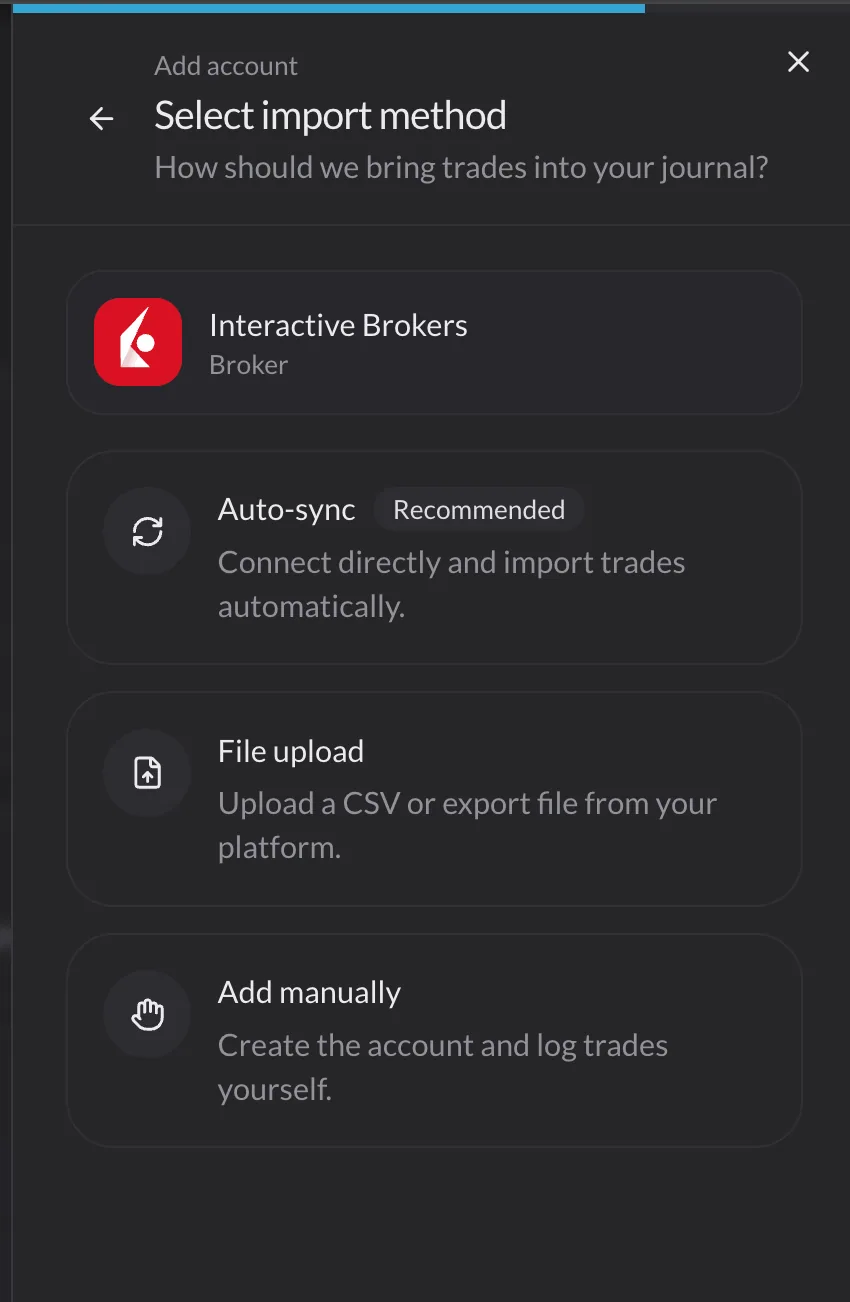
Step 3 — Import or connect
Option A — CSV import (Free): export from MT4, MT5, Rithmic, Webull, or any broker that offers trade history CSV.
Option B — Broker auto-sync (Essential): connect IBKR, Tradovate, or Apex and let fills flow in automatically.
Step 4 — Tag your top three setups
Do not create twenty categories. Pick the three strategies you actually trade. Tags turn a trade list into a performance report by setup — the fastest way to find an edge.
Step 5 — Schedule a weekly review
Block 20 minutes every weekend. Open the performance calendar, sort losing days, and read notes from your worst trade. That single habit separates journal-keepers from journal-quitters.
Read your performance calendar before you tweak strategy
Most traders jump straight to indicators. Your free trading journal already knows when you trade best — if the calendar is visible.
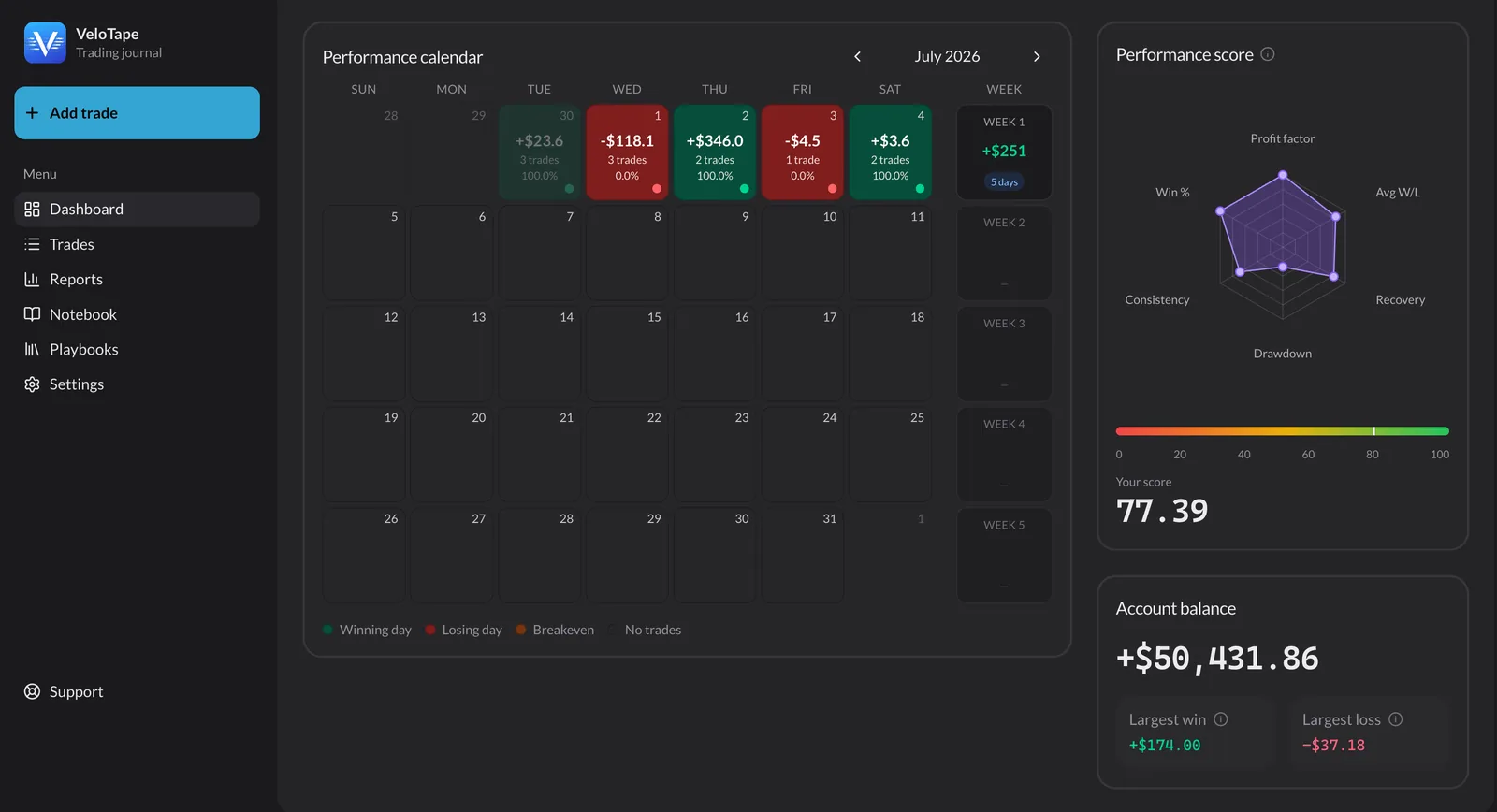
Look for:
- Losing streaks on specific weekdays — are you forcing trades on slow Tuesdays?
- Green clusters after rest days — does skipping a session help focus?
- Outlier red days — one rule break or one oversized position?
The calendar turns months of fills into a pattern you can feel in five seconds. That is why it belongs in any serious journal — free or paid.
Organize fills in a trade log you will actually search
A spreadsheet row is fine until you have 400 rows and no filters. A proper trade log lets you slice history by tag, symbol, side, or date range.
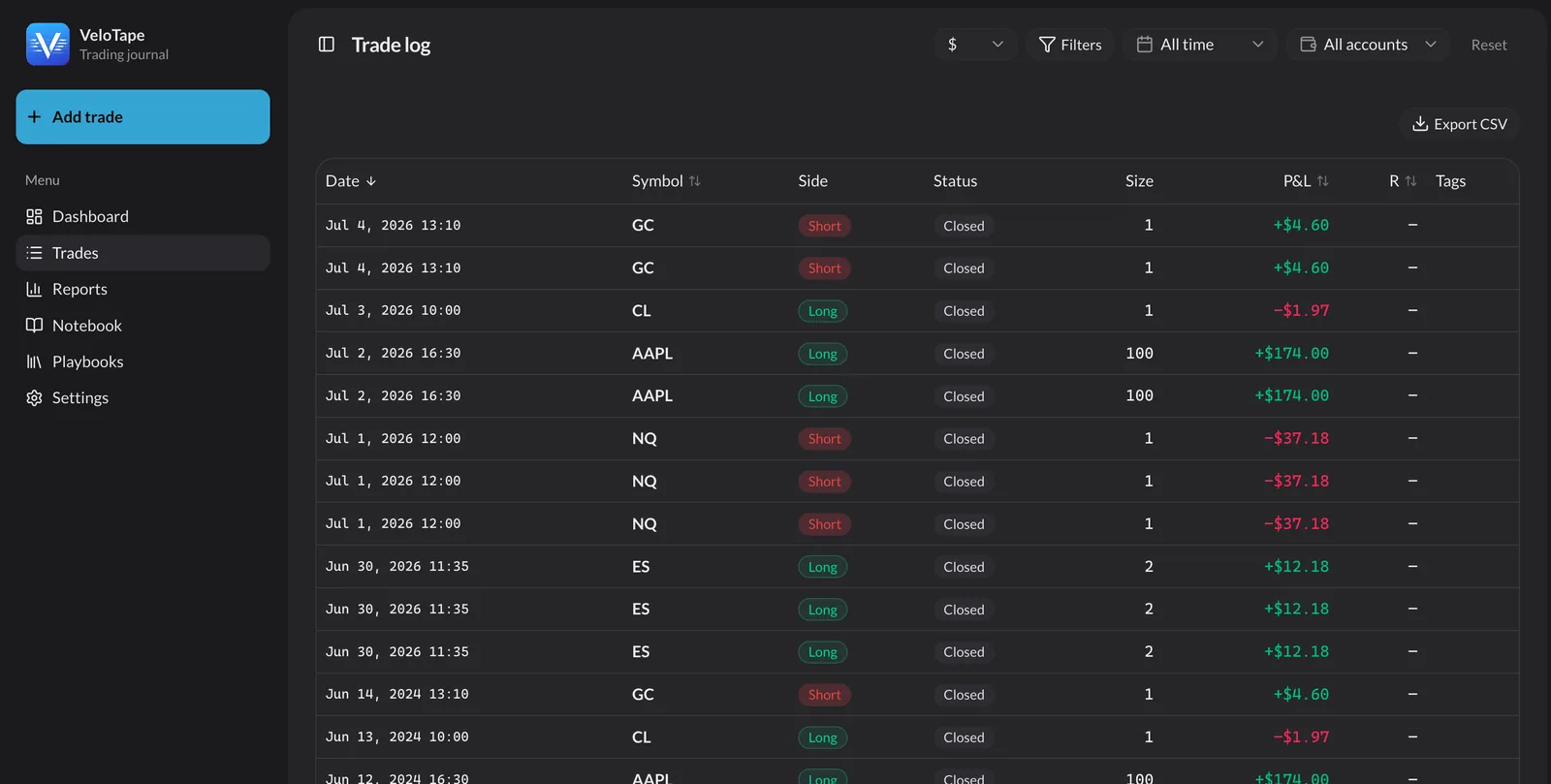
Use the log to answer concrete questions:
- What is my win rate on ES breakout trades vs NQ reversal trades?
- Which symbols produce my largest average loss?
- Do I exit winners too early on Fridays?
VeloTape calculates these breakdowns from the same data you imported — no pivot tables required.
Free trading journal options compared (2026)
Prices and limits change. Verify on each vendor's site before you decide. This comparison focuses on free-tier positioning, not every premium feature.
VeloTape
Top pickBest for: Free start; sync + Coach + Mentor on Essential
- Free tier
- Yes — no credit card
- Broker sync
- CSV free; IBKR, Tradovate, Apex on Essential
- Analytics
- Core metrics, calendar, 50+ reports
TradesViz
Best for: Budget-conscious data traders
- Free tier
- Yes — with limits
- Broker sync
- CSV + growing API list
- Analytics
- Deep stats on paid tiers
Tradervue
Best for: Community & mentoring
- Free tier
- Limited free history
- Broker sync
- API + CSV
- Analytics
- Solid core reports
Google Sheets
Best for: Low volume, full control
- Free tier
- Always free
- Broker sync
- Manual entry only
- Analytics
- Build your own formulas
TradeZella
Best for: All-in-one paid workflow
- Free tier
- No free plan
- Broker sync
- 500+ brokers (paid)
- Analytics
- Very deep (paid)
| Tool | Free tier | Broker sync | Analytics |
|---|---|---|---|
VeloTapeTop pick Best for: Free start; sync + Coach + Mentor on Essential | Yes — no credit card | CSV free; IBKR, Tradovate, Apex on Essential | Core metrics, calendar, 50+ reports |
TradesViz Best for: Budget-conscious data traders | Yes — with limits | CSV + growing API list | Deep stats on paid tiers |
Tradervue Best for: Community & mentoring | Limited free history | API + CSV | Solid core reports |
Google Sheets Best for: Low volume, full control | Always free | Manual entry only | Build your own formulas |
TradeZella Best for: All-in-one paid workflow | No free plan | 500+ brokers (paid) | Very deep (paid) |
Prices and limits change. Verify on each vendor's site before you decide.
VeloTape is built for traders who want journal + analytics without a subscription on day one. When you are ready, Essential adds broker sync, Coach AI, and Mentor Mode (join as a student), and Pro adds Trade Replay plus mentor invites — many of our users start free and upgrade only when the data proves they journal daily.
Five mistakes that kill a free trading journal habit
- Logging too many fields on day one — start with execution data; add psychology notes later.
- Skipping losing trades — those are the trades that teach you most.
- Never reviewing — logging without review is bookkeeping, not improvement.
- Changing tools every month — pick one system for at least 30 sessions.
- Treating the journal like a signal service — it reflects your edge; it does not create one.
FAQ
Is VeloTape really a free trading journal?
Yes. VeloTape offers a free plan with trade logging, core performance metrics, and CSV import — with no credit card required. Essential adds broker auto-sync, Coach AI, and Mentor Mode (join as a student); Pro adds Trade Replay and mentor invites.
Can I use a spreadsheet as a free trading journal?
Absolutely. Spreadsheets work when volume is low and you want full control. Most active traders switch once manual entry eats more than 30 minutes per week.
What is the best free online trading journal?
The best free online trading journal is the one you open after every session. Prioritize easy imports, automatic metrics, a performance calendar, and setup tags.
Do I need broker auto-sync?
Not immediately. CSV import is enough to start. Auto-sync pays off when you trade daily or run multiple accounts.
What should I track at minimum?
Symbol, direction, entry/exit, size, net P&L, fees, setup tag, and one sentence on why you entered.
Is a journal worth it for beginners?
Yes — beginners who journal weekly improve rule awareness faster than those who do not. Keep the template simple.
Does VeloTape provide investment advice?
No. VeloTape is for journaling and analytics only — not recommendations or brokerage services. See our Terms for details.
Start your free trading journal today
You do not need the perfect tool. You need trades logged, metrics visible, and a weekly review on the calendar.
Create your free VeloTape account — no credit card required. Import your last 30 days, tag three setups, and review your first performance calendar this weekend.
More guides

How to Keep a Trading Journal: A Step-by-Step System That Sticks
Learn what to log after every trade, build a daily and weekly review routine, and use a simple template so your trading journal actually improves performance.

5 Trading Journal Metrics Every Trader Should Track
Win rate, profit factor, expectancy, max drawdown, and time-of-day performance — what each metric means, the formulas, and how to read them in your journal.

Trading Journal for Prop Firm Traders: Rules, Metrics & Challenge Workflow
Track daily loss limits, max drawdown, and challenge progress with Prop Desk on Free — plus CSV import and Apex/Tradovate sync on Essential.
Trading involves substantial risk. VeloTape is for journaling and analytics only — not investment advice.