VeloTape
×VeloTape

Przewodnik integracji

Jak używać Rithmic R Trader z VeloTape

Wyeksportuj Order History z R | Trader Pro i prześlij CSV, aby zapisać fills futures w dzienniku.

Przesyłanie pliku

Przegląd

Rithmic nie oferuje jeszcze publicznego auto-sync dla dzienników. Eksportuj Completed Orders z R | Trader Pro jako CSV i prześlij plik do VeloTape.

FuturesMicro futures
Przesyłanie pliku

Import trades from an R | Trader Pro Order History CSV

Follow these steps to export filled orders and upload them to VeloTape. Configure columns on the Completed Orders grid before you export — Rithmic only writes visible columns.

1

Open Order History in R | Trader Pro

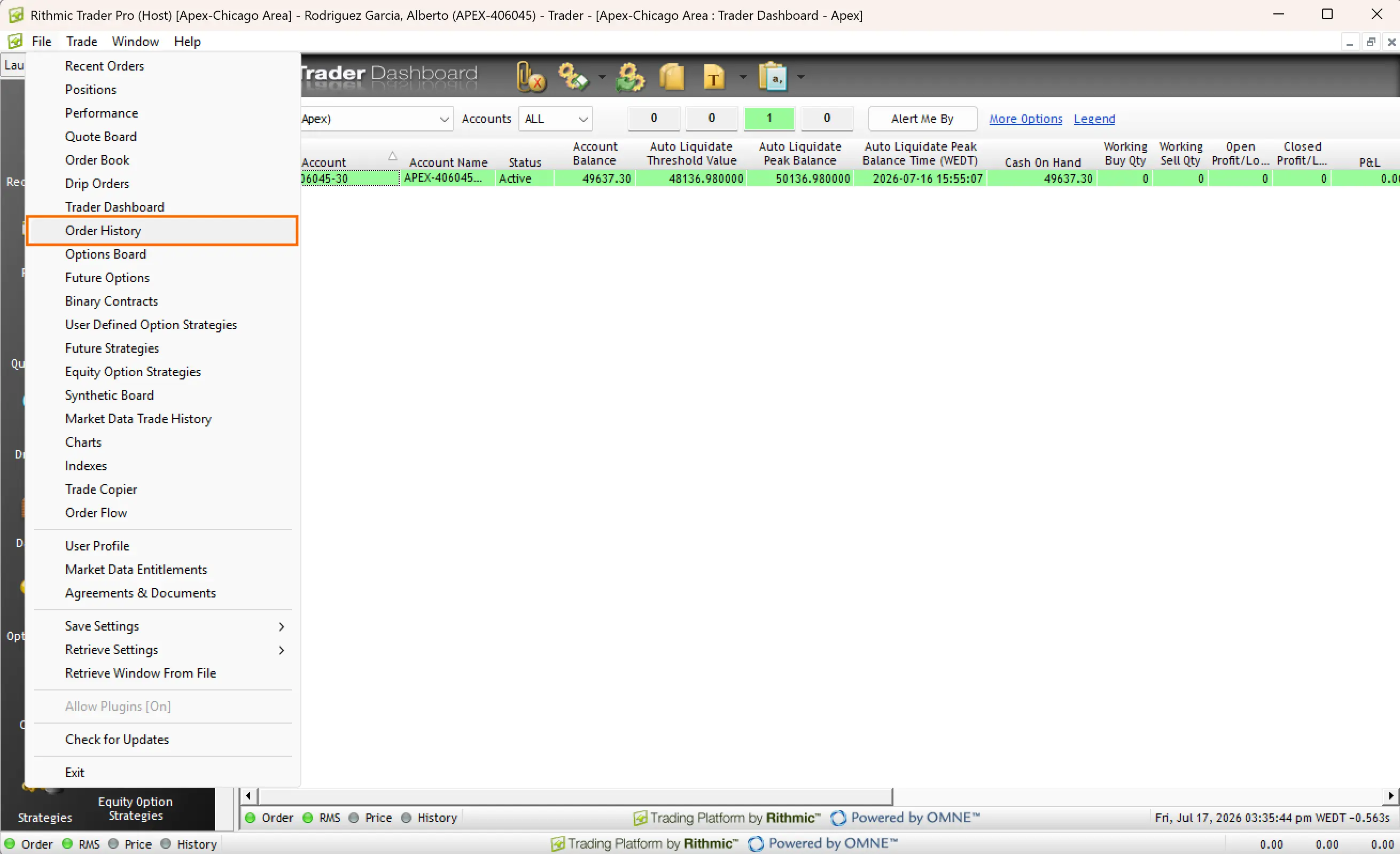
  1. Launch R | Trader Pro and log in to your prop firm or FCM system.
  2. Open File in the top-left menu.
  3. Select Order History from the dropdown.
Menu File w R | Trader Pro z wyróżnionym Order History
2

Choose the account and date

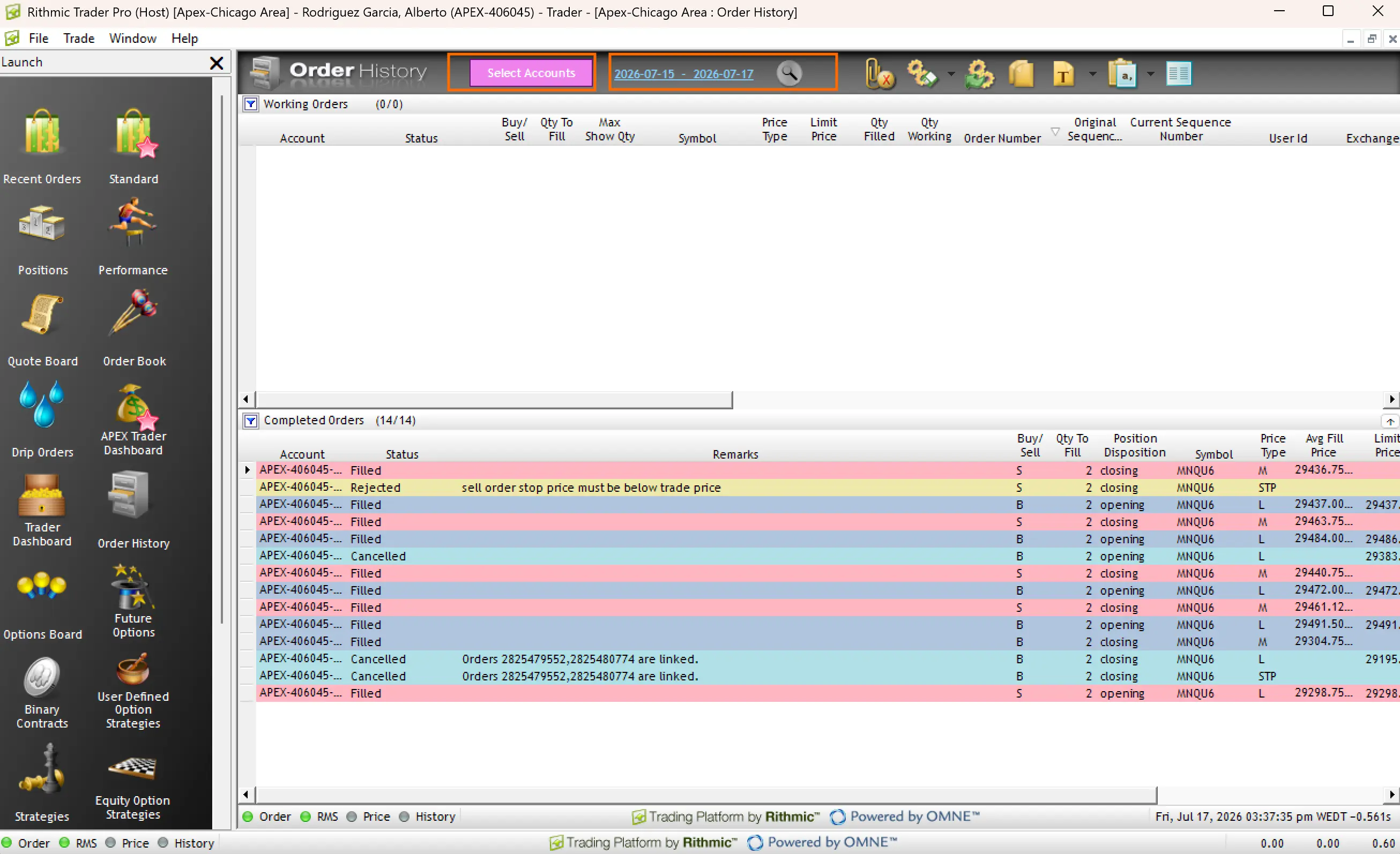
  1. In the Order History window, select the account you want to import.
  2. Pick the trading date to export.
  3. Confirm filled rows appear under Completed Orders.

R | Trader Pro exports one day at a time. Repeat the export for each day you want in VeloTape.

Order History w R | Trader Pro z wyróżnionymi polami Account i Date
3

Show the required columns in Completed Orders

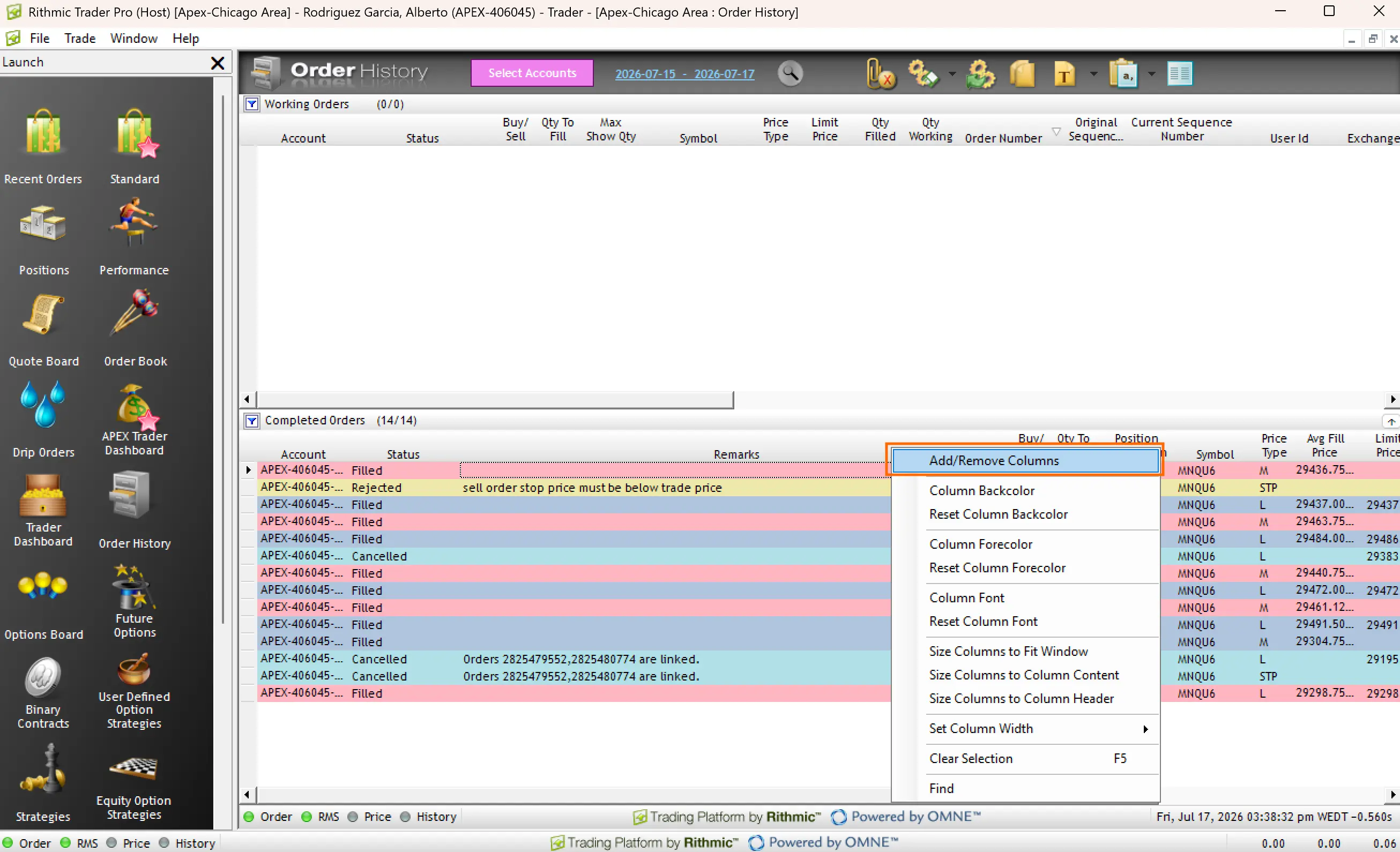
  1. In the Completed Orders section (not Working Orders), right-click a column heading.
  2. Click Add/Remove Columns.
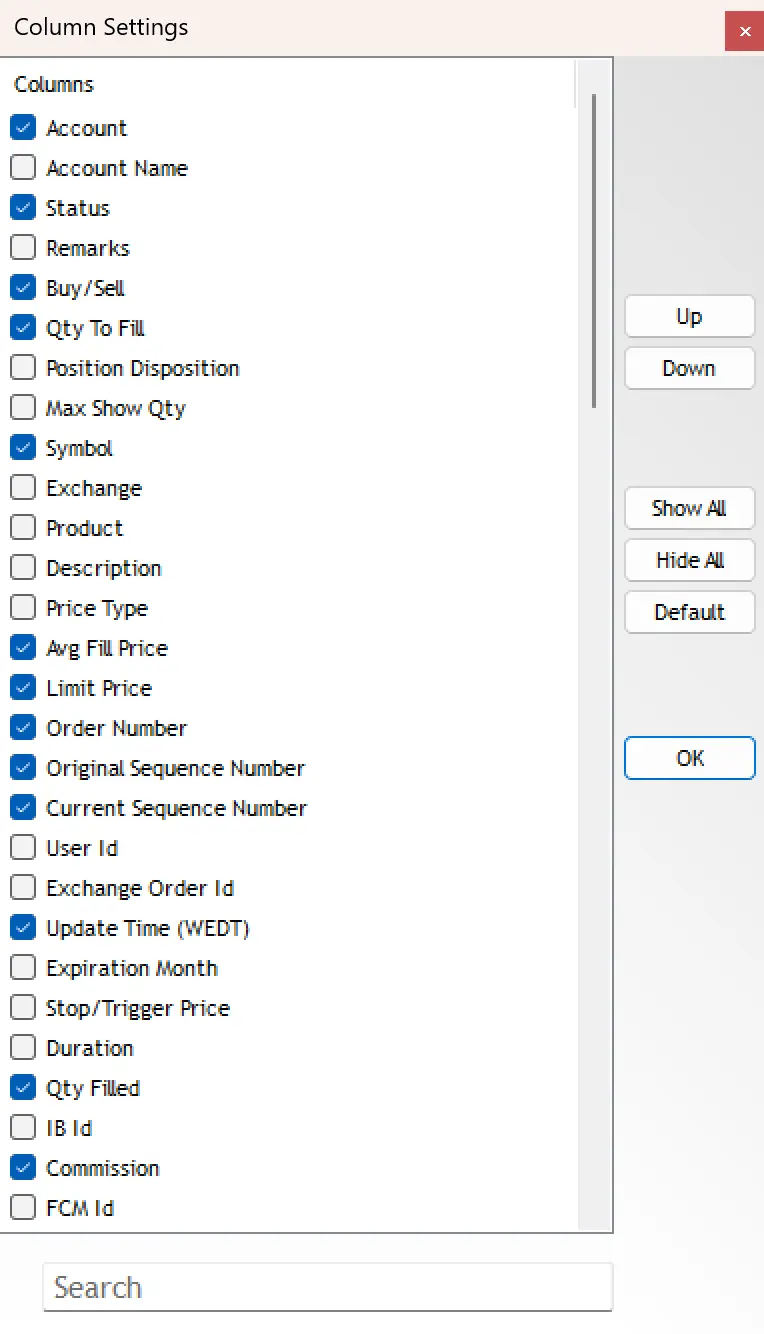
  3. Enable at least: Account, Status, Remarks, Buy/Sell, Qty To Fill, Symbol, Qty Filled, Avg Fill Price, Limit Price, Order Number, Create Time, Update Time, and Commission when available.
  4. Click OK.

Working Orders and Completed Orders have separate column settings. Always configure Completed Orders before export.

Sekcja Completed Orders z wyróżnionym Add/Remove Columns
Okno Column Settings z zaznaczonymi Qty Filled i innymi wymaganymi kolumnami
4

Export as CSV

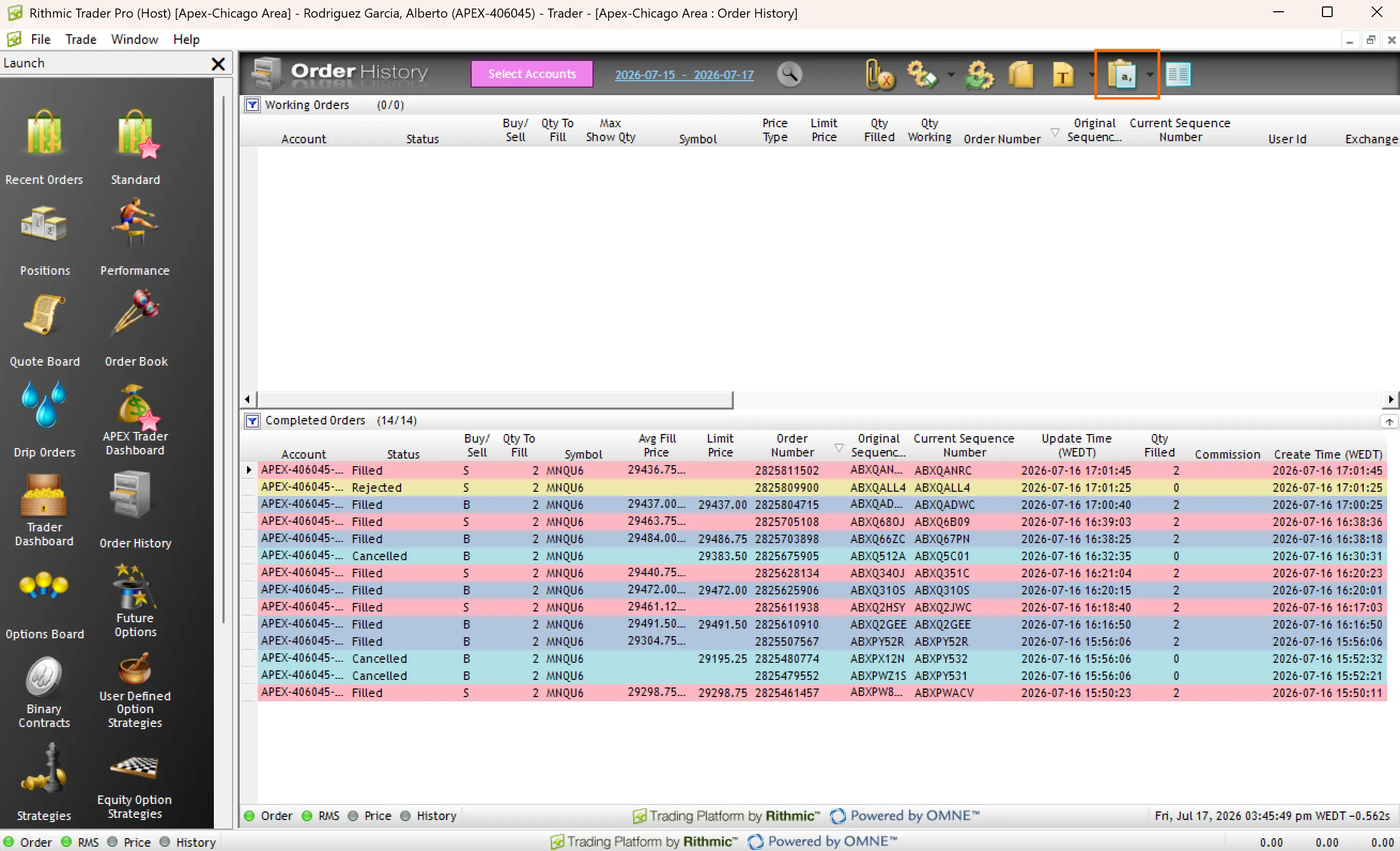
  1. On the Order History toolbar, open the spreadsheet / export menu.
  2. Choose Export As CSV.
  3. Save the file without editing it in Excel — keep the Working Orders and Completed Orders sections as exported.
Pasek Order History z wyróżnionym Export As CSV
5

Upload the CSV in VeloTape

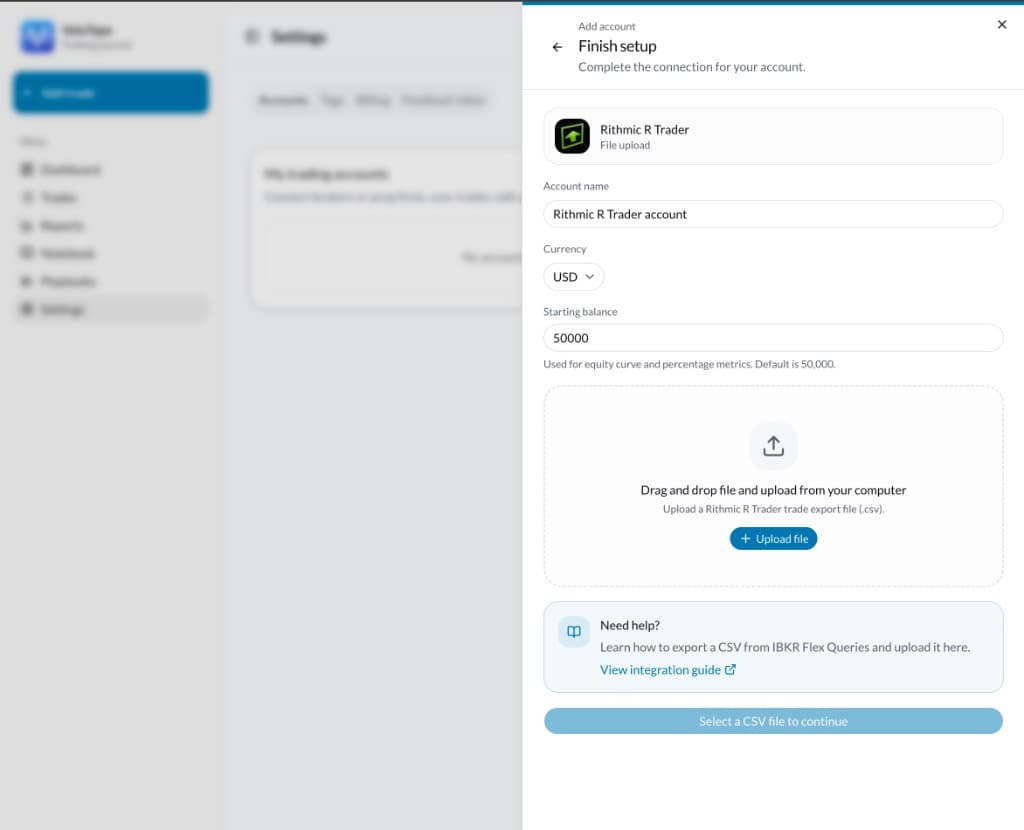
  1. Open Settings → Accounts → Add account.
  2. Choose Prop firm → Rithmic R Trader → File upload (or Apex via Rithmic).
  3. Enter the account name, currency, and starting balance.
  4. Select the Order History CSV and create the account.
  5. Review the grouped round-trip trades, then confirm the import.

VeloTape reads the Completed Orders table, keeps Filled rows only, and groups fills into round trips per symbol.

Ekran Finish setup w VeloTape do przesyłania CSV Rithmic R Trader
ProblemCo spróbować
Missing Symbol, Buy/Sell, Qty Filled, or Avg Fill PriceAdd those columns on the Completed Orders grid, then export again. Do not rename columns in a spreadsheet.
0 trades importedConfirm the file has Filled rows under Completed Orders. Cancelled and Rejected rows are skipped.
Wrong day or incomplete historyExport each trading day separately and upload every CSV for that account.
Unsupported or empty CSVExport from Order History with Export As CSV. Keep the multi-section file; do not paste into a new sheet first.

Często zadawane pytania

Is Rithmic auto-sync available?
Not yet. Direct sync needs R | Protocol API access and Rithmic conformance. Use CSV import after each session until then.
Which prop firms work with this guide?
Any account that trades through R | Trader / Rithmic — including Apex, Topstep, Bulenox, Earn2Trade, and similar — as long as you export Order History CSV.
Can I export more than one day at once?
R | Trader Pro Order History is day-scoped. Export once per day and upload each file to the same VeloTape account.
Are commissions included?
Yes when the Commission column is visible at export time. If it is hidden, P&L may omit commissions.
Will re-uploading the same day create duplicates?
VeloTape matches fills within the account to avoid duplicate round trips when you re-import overlapping exports.

Importuj transakcje z innych brokerów i platform w tym samym prowadzonym procesie.

VeloTape nie jest powiązany z Rithmic ani R | Trader Pro. Użycie tych nazw lub logo ma charakter informacyjny i nie oznacza poparcia. Handel futures wiąże się z istotnym ryzykiem.