VeloTape
StartseiteBlogFunktionenPreise
VeloTape

Ein fokussierter Arbeitsbereich zum Importieren von Trades, Prüfen der Ausführung und Umwandeln von Performancedaten in einen wiederholbaren Prozess.

24 Auto-Sync-Verbindungen verfügbar

Produkt

FunktionenAuto-SyncEmpfohlenPreiseDashboard

Ressourcen

BlogApex Prop DeskTopstep Prop DeskTradeZella-AlternativeKontaktInteractive-Brokers-LeitfadenTradovate-LeitfadenRithmic-LeitfadenBingX-AnleitungLoslegen

Rechtliches

DatenschutzAGB

Empfohlene Integrationen

NinjaTraderKinetick

Trading birgt erhebliche Risiken und ist nicht für jeden geeignet. VeloTape ist nur ein Journal- und Analyse-Tool — wir bieten keine Anlageberatung oder Handelsempfehlungen.

Futures and forex trading contains substantial risk and is not for every investor. An investor could potentially lose all or more than the initial investment. Risk capital is money that can be lost without jeopardizing ones' financial security or lifestyle. Only risk capital should be used for trading and only those with sufficient risk capital should consider trading. Past performance is not necessarily indicative of future results.

Hypothetical performance results have many inherent limitations, some of which are described below. No representation is being made that any account will or is likely to achieve profits or losses similar to those shown; in fact, there are frequently sharp differences between hypothetical performance results and the actual results subsequently achieved by any particular trading program. One of the limitations of hypothetical performance results is that they are generally prepared with the benefit of hindsight. In addition, hypothetical trading does not involve financial risk, and no hypothetical trading record can completely account for the impact of financial risk of actual trading. For example, the ability to withstand losses or to adhere to a particular trading program in spite of trading losses are material points which can also adversely affect actual trading results. There are numerous other factors related to the markets in general or to the implementation of any specific trading program which cannot be fully accounted for in the preparation of hypothetical performance results and all of which can adversely affect trading results.

© 2026 VeloTape. Alle Rechte vorbehalten.

AnmeldenRegistrieren
×VeloTape

Integrationsanleitung

Tradovate-Trades in VeloTape importieren

Upload an Orders CSV, or connect Tradovate to sync fills automatically when available on your plan.

Kostenloses Konto erstellenAnmelden
Auto-syncFile upload

Überblick

Use Orders CSV import today, or connect Tradovate for read-only fill sync when auto-sync is available on your plan.

FuturesMicro-Futures
Tradovate besuchen
Auto-sync

Connect Tradovate

Sign in with Tradovate to import fills without sharing your Tradovate password with VeloTape.

CSV import stays available for every account. Auto-sync requires a paid plan with broker sync entitlement.

1

Connect in Settings

  1. Open Settings → Accounts → Add account.
  2. Choose Broker → Tradovate → Auto-sync.
  3. Pick Live or Demo / Sim, then continue to Tradovate login.
  4. Approve access and select the Tradovate account to link.
  5. Use Sync now on the accounts table after connecting.

You’ll sign in on Tradovate, then return here to finish linking your account.

ProblemLösungsvorschlag
Auto-sync is marked Coming soonAuto-sync isn’t available for your account yet. Use Orders CSV until it is.
Couldn’t finish connectingStart Connect again from Settings → Accounts. If it keeps failing, try again in a moment or contact support.
No accounts after loginConfirm Live vs Demo matches the Tradovate environment where your accounts exist.
File upload

Trades aus einer Tradovate-Orders-CSV importieren

Befolgen Sie diese Schritte, um den Orders-Bericht herunterzuladen und in VeloTape hochzuladen.

1

Tradovate-Orders-CSV herunterladen

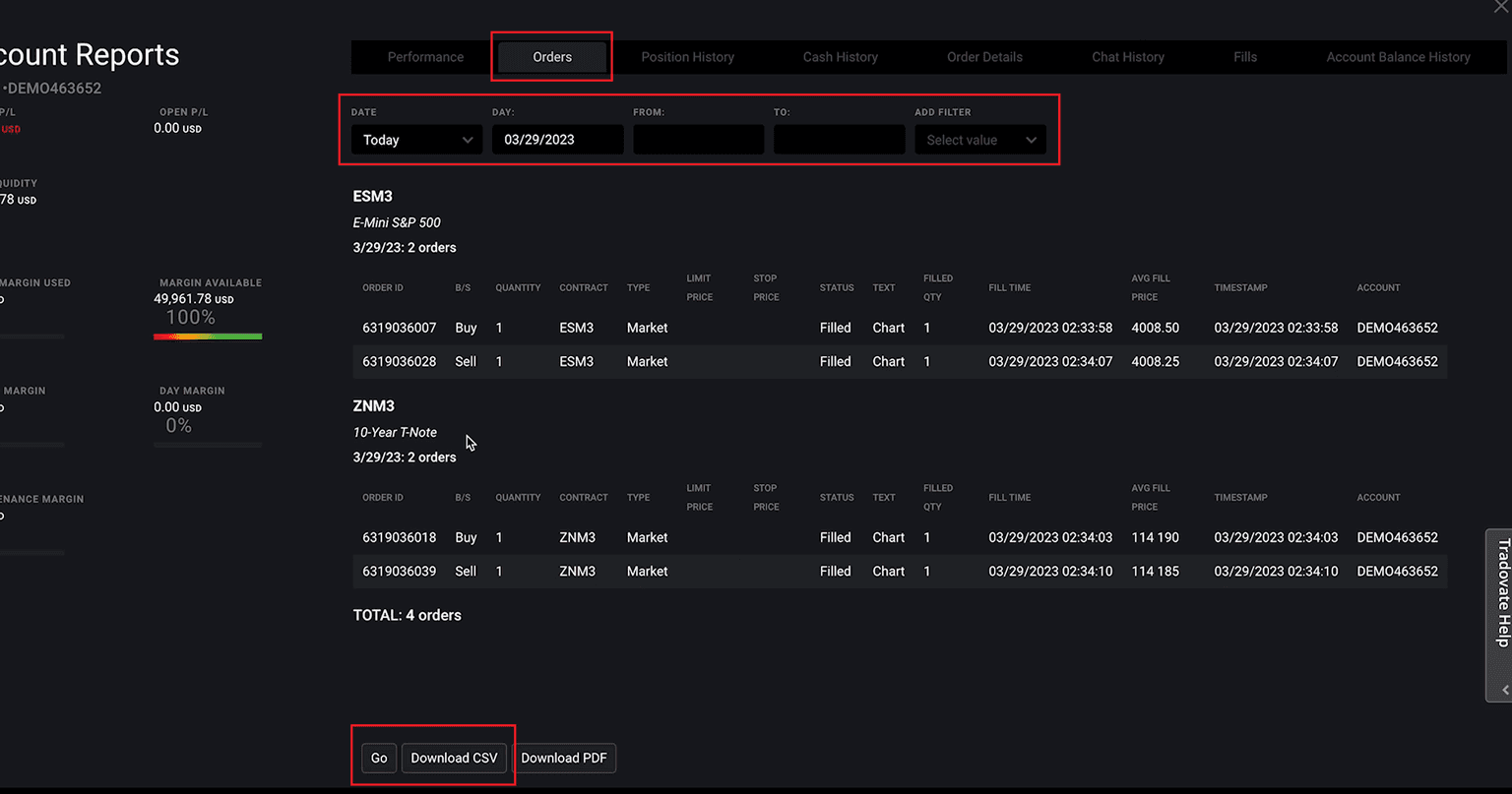
  1. Öffnen Sie Tradovate Desktop und gehen Sie zu Accounts.
  2. Öffnen Sie die Einstellungen des Kontos, das Sie importieren möchten.
  3. Wählen Sie Orders, nicht Performance.
  4. Wählen Sie den Datumsbereich, klicken Sie auf Go und dann auf Download CSV.

Tradovate exportiert Zeitstempel in Ihrer lokalen Zeitzone.
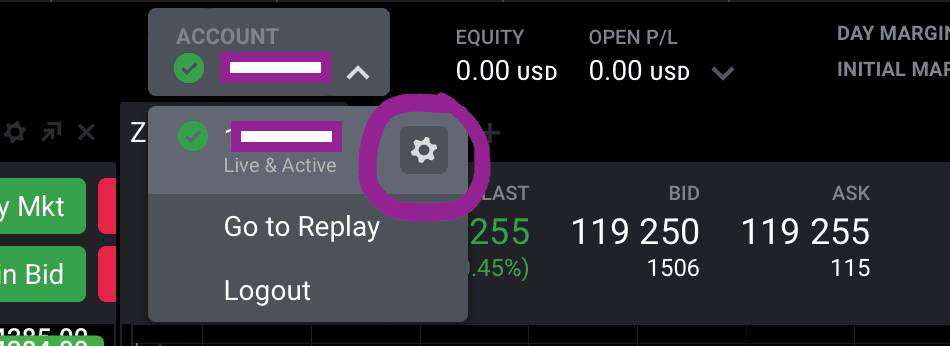
Tradovate-Kontomenü mit hervorgehobenem Einstellungssymbol
Tradovate Account Reports mit hervorgehobenen Bereichen Orders, Zeitraum und Download CSV
2

CSV-Datei in VeloTape hochladen

  1. Öffnen Sie Einstellungen → Konten → Konto hinzufügen.
  2. Wählen Sie Broker → Tradovate → Datei-Upload.
  3. Geben Sie Kontoname, Währung und Anfangssaldo ein.
  4. Wählen Sie die aus Tradovate heruntergeladene Orders-CSV-Datei aus.
  5. Erstellen Sie das Konto und importieren Sie die Datei.

Die standardmäßige Orders-CSV kann Provisionen auslassen.

ProblemLösungsvorschlag
Nicht unterstützte CSV-Datei oder fehlende SpaltenLaden Sie den Orders-Bericht erneut herunter und laden Sie die ursprüngliche CSV-Datei hoch, ohne ihre Spalten zu ändern.
Ein- oder Ausstiegszeiten sind verschobenTradovate exportiert lokale Zeitstempel. Prüfen Sie, ob der Computer dieselbe Zeitzone wie beim Herunterladen der CSV-Datei verwendet.
Offene oder stornierte Orders fehlenDer Import umfasst ausgeführte Orders; offene und stornierte Orders erscheinen nicht als Trades.

Häufig gestellte Fragen

Welchen Tradovate-Bericht soll ich exportieren?
Exportieren Sie den Orders-Bericht als CSV-Datei. Exportieren Sie nicht den Performance-Bericht.
Is Tradovate auto-sync available?
Orders CSV works for everyone. Auto-sync is available when Connect is enabled for your account. Until then, Auto-sync may show as Coming soon.
Warum können die Uhrzeiten verschoben sein?
Tradovate exportiert lokale Zeitstempel. Die Zeiten können daher verschoben sein, wenn die Zeitzone des Computers von der beim Export verwendeten abweicht.
Sind Provisionen enthalten?
Die standardmäßige Tradovate-Orders-CSV kann Provisionen auslassen.

Handelst du bei einer Prop Firm?

Prop Desk im Free-Plan verfolgt Tagesverlust, Trailing-Drawdown und Payout-Bereitschaft aus geschlossenen Trades — In-App-Gauges und Warnungen, kein Live-Trade-Blocking.

  • Apex Trader Funding JournalTrailing-DD, Tagesverlust und PA-Payout-Checkliste aus geschlossenen Fills.
  • TradeZella-AlternativeFree + Essential $14.99 vs. TradeZella ab $35/Monat — ehrlicher Vergleich.

Weitere Integrationsleitfäden

Anleitungen zum Verbinden weiterer Broker und Plattformen mit VeloTape.

Interactive Brokers

Flex-Sync und CSV-Import für Interactive Brokers.

Rithmic R Trader

R | Trader Pro Order History exportieren und CSV importieren.

BingX

Schreibgeschützte API und Order-History-CSV für BingX USD-M Perpetual.

VeloTape ist nicht mit Tradovate verbunden. Die Verwendung des Namens oder Logos von Tradovate dient ausschließlich Informationszwecken und stellt keine Empfehlung dar. Der Handel mit Futures ist mit erheblichen Risiken verbunden. Für NinjaTrader und Kinetick siehe den Bereich Empfohlen auf der Startseite.
Kostenloses Konto erstellenAnmelden